
🇧🇷 Pix Pay-In Implementation
Developers can learn how to implement pix pay-ins.
Overview
Merchants can accept payments via Brazilian PIX accounts. With PIX pay-ins merchants can display the purchase amount in Brazilian Real, and end-users can complete their payments directly with their PIX account. This reduces any currency conversion confusion, and gives end-users more transparency and trust in how much the total cost of a purchase will be. Upon a successful payment, Merchants receive USDC to their settlement location.
👍 Try making a purchase with PIX yourself on our demo app!
How It Works
- Merchant defines their revenue settlement location.
- Merchant fetches a quote for how much a purchase will be including all fees associated with the transaction.
- Merchant displays purchase amount in BRL to end-user.
- Merchant calls Pix Payment Order endpoint and displays QR code to end-user.
- End-user scans QR with mobile device to complete purchase.
- End-user receives push notification or email that their payment has been completed.
- Merchant sees BRL payment in merchant dashboard.
- Merchant receives USDC in defined settlement location.
API Implementation
- Note: Ensure the subtotal passed here is the purchase value in USD.
curl --location 'https://api-sandbox.coinflow.cash/api/checkout/pix/order/<YOUR_MERCHANT_ID>' \
--header 'accept: application/json' \
--header 'content-type: application/json' \
--header 'x-coinflow-auth-blockchain: solana' \
--header 'x-coinflow-auth-session-key: eyJhbGciOiJIUzI1NiIsInR5cCI6IkpXVCJ9.eyJjdXN0b21lcklkIjoidGVzdDEyMyIsIm1lcmNoYW50SWQiOiJ0ZXN0dGVzdCIsImlhdCI6MTcyOTc4OTU3NiwiZXhwIjoxNzI5ODc1OTc2fQ.HvCOrraNCZjnsYQ1Cm96QkXRm-2GqVW-y_VXLMJcjTU' \
--data-raw '
{
  "subtotal": {
    "cents": 100 // Purchase amount in USD
  },
  "email": "[email protected]"
}
'


// Response
{
    "brCode": "00020126840014br.gov.bcb.pix01366f313eaf-3fd9-48d9-958f-4a4f3567752f0222Compra de Criptoativos52040000530398654045.005802BR5917Brla Digital Ltda6009Sao Paulo6223051900001IP2U2OKGTu8hHH6304B7FB",
    "paymentId": "6f313eaf-3fd9-48d9-958f-4a4f3567752f",
    "quote": {
        "cents": 547,
        "currency": "BRL"
    }
}- Pass the brCode returned from Step 1 into a QR code scanner and display the QR code to the end-user.
Note: You may use any qr code generating library. For example purposes, we are using react-qr-code.
import QRCode from "react-qr-code";

function App() {
  return (
    <div>
      <QRCode value="00020126840014br.gov.bcb.pix01366f313eaf-3fd9-48d9-958f-4a4f3567752f0222Compra de Criptoativos52040000530398654045.005802BR5917Brla Digital Ltda6009Sao Paulo6223051900001IP2U2OKGTu8hHH6304B7FB" />
    </div>
  );
}

export default App;
- Listen for
Settledpurchase events.
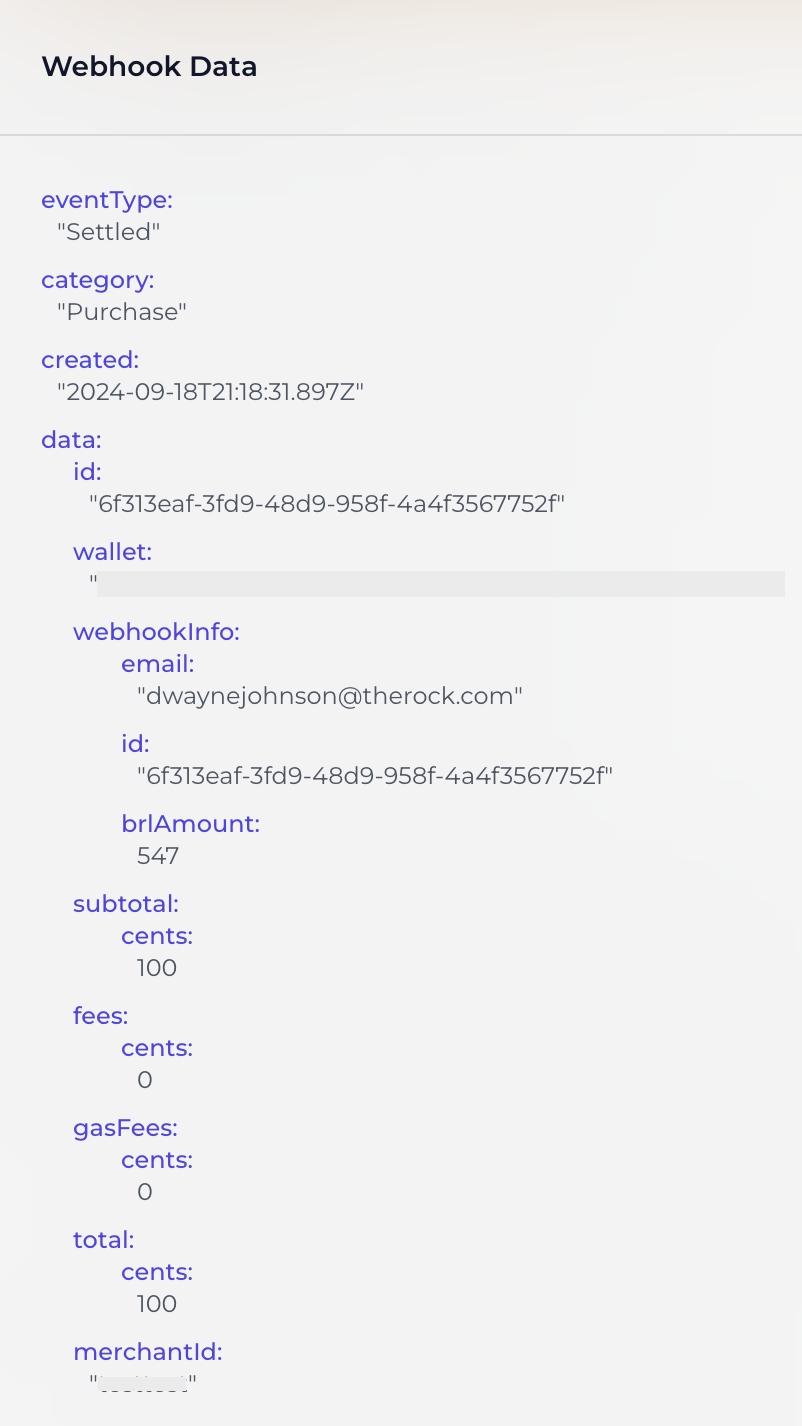
Example of a Settled Webhook
- See payment record on merchant dashboard.
- Note: Purchase amount will display in USD on the merchant dashboard.

Example of payment record on merchant dashboard.
🚧In sandbox, the payment autocompletes itself after 5 seconds and the webhook gets sent.
There currently is no way to mock sandbox payments in the PIX system.
📘Pix Payment Window
Once a QR code is generated, customers have 5 minutes to complete the payment. This time limit ensures that foreign exchange (FX) rates remain accurate, preventing potential discrepancies that could arise if the payment is made days or weeks after the quote is issued. If the QR code has expired, the purchase status will display as
Expired.
Updated 12 months ago