
Merchant (Rapid's in-app Wallet) Payouts
Developers can use this documentation to implement merchant payouts (from Rapid's in-app wallet) to an end-user's bank account / debit card.
If you’re a merchant using Rapid's in-app wallet as the source of funds for user payouts, follow these steps to send fiat payouts to users’ bank accounts.
Note: Rapid does not provide a UI for Merchant Payouts. You must use the API.
Flow of Funds
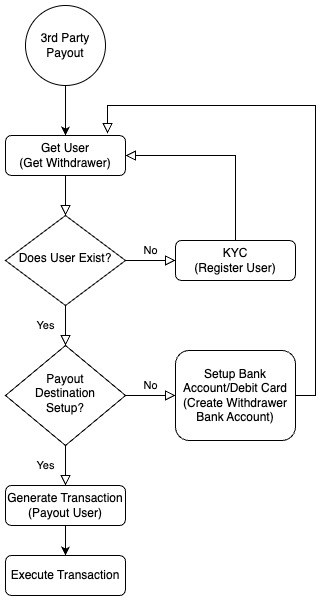
Implementation Steps
-
Verify Users
Use Approvely's KYC/KYB endpoints to verify individual or business withdrawers: -
Add Payout Destinations
Allow users to set up payout methods based on location:-
U.S. Users
- Create Bank Account
- Create Debit Card (learn about Debit Card Tokenization)
-
European/UK Users
-
Brazilian Users
-
Important: Merchants must implement Bank Authentication for bank payouts to comply with AML policies before going live.
-
Display Withdrawal Quotes
Retrieve the USDC token address to withdraw from your wallet (USDC Token Addresses) and get withdraw quotes using the Get Quote endpoint. -
Initiate Payouts
Use the Delegated Payout endpoint to pay users from your Rapid wallet. Check Payout Speeds docs for the rightspeedparameter per payout method.To get the token for a bank account or card, call Get Withdrawer and access the token under
bankAccounts[0]['token']. -
(Optional) View Withdrawer History
Check past transactions with the Get Withdrawer History endpoint.
Testing the Payout Flow
- Complete KYC/KYB for the end user.
- Link a payout destination.
- Send USDC to your merchant wallet using the sandbox faucet — this funds your payouts.
- Submit the payout request for processing.
- Verify successful withdrawals in your Merchant Admin Dashboard.
If you want, I can also help you create example API calls or sample code for these steps!
Updated 12 months ago