
Onboarding for Remittance Merchants
A React Native SDK for integrating Approvely's credit-based payment system with purchase and redemption capabilities.
Table of Contents
Setup
Prerequisites
Before starting integration, you MUST complete the account setup section:
- Register a sandbox merchant account or Login to your sandbox merchant account
- Create sandbox API Key
- Add Team Members to your sandbox account
- Add chargeback protection script to every page of your app (if adding support for credit cards)
Onboarding Checklist
Track your onboarding progress with this shared checklist to stay aligned on status, outstanding tasks, and next steps.
Developer Resources
- How credits work
- On-chain settlement on Solana
- Testing Account Numbers for Sandbox
- Custom Branding Guidelines
Authorization Headers
Authorization: Your API Key (generate from merchant dashboard)x-coinflow-auth-user-id: Unique customer ID from your systemx-coinflow-auth-blockchain: Should always besolanaif settlement location is Approvely in-app walletx-coinflow-auth-session-key: JWT that authorizes the payer (valid for 24 hours)
Flow of Funds
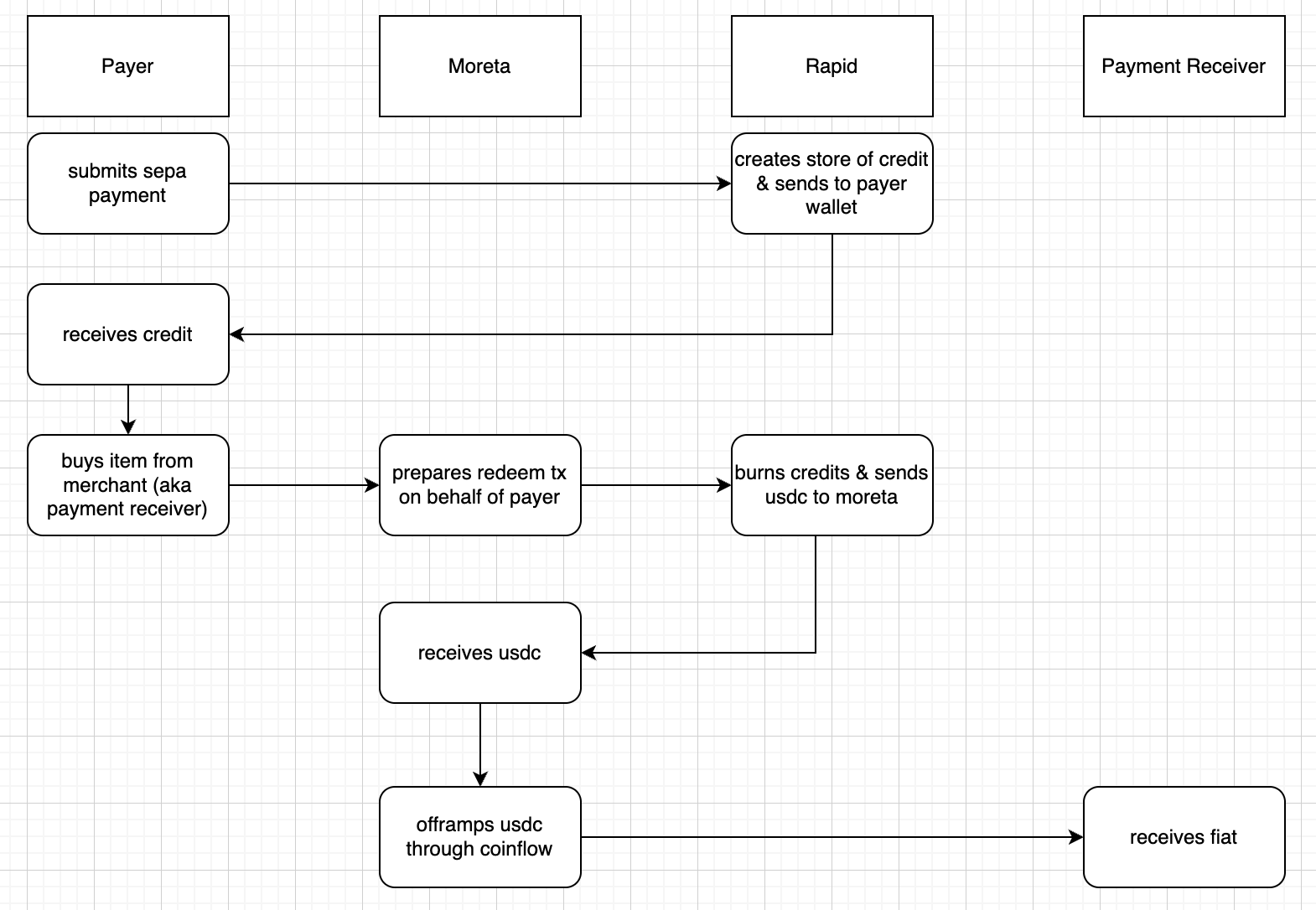
Implementation
Installation
npm i @coinflowlabs/react-nativeEnable Payers to Purchase Credits
Step 1: Tokenize Checkout Parameters
Tokenize the checkout parameters to encrypt them and prevent tampering. Use the JWT Token endpoint.
Request:
curl --request POST \
  --url https://api-sandbox.approvely.com/api/checkout/jwt-token \
  --header 'Authorization: YOUR_API_KEY' \
  --header 'accept: application/json' \
  --header 'content-type: application/json' \
  --data '{
    "subtotal": {
      "currency": "USD",
      "cents": 200
    },
    "blockchain": "solana",
    "email": "[email protected]",
    "deviceId": "123456789",
    "settlementType": "Credits",
    "chargebackProtectionData": [
      {
        "productName": "My Item",
        "quantity": 1,
        "rawProductData": {
          "example": "{\"description\": \"asdf\"}"
        },
        "productType": "topUp"
      }
    ],
    "webhookInfo": {
      "example": "{\"someId\":\"123abc\"}"
    }
  }'
Response:
{
  "checkoutJwtToken": "eyJhbGciOiJIUzI1NiIsInR5cCI6IkpXVCJ9..."
}
Step 2: Implement Approvely Purchase Component
<CoinflowPurchase
  wallet={{
    publicKey: PublicKey,
    signMessage: (message: UInt8Array) => Promise,
    sendTransaction: (transaction: Transaction | VersionedTransaction) => Promise
  }}
  env='sandbox' // Change to 'prod' for production
  connection={connection} // Solana RPC connection
  blockchain='solana'
  merchantId='YOUR_MERCHANT_ID'
  origins={['http://localhost:3000/']}
  jwtToken={'eyJhbGciOiJIUzI1NiIsInR5cCI6IkpXVCJ9...'} // From step 1
/>
Enable Payers to Redeem Credits
Step 1: Tokenize Checkout Parameters for Redemption
curl --request POST \
  --url https://api-sandbox.approvely.com/api/checkout/jwt-token \
  --header 'Authorization: YOUR_API_KEY' \
  --header 'accept: application/json' \
  --header 'content-type: application/json' \
  --data '{
    "subtotal": {
      "currency": "USD",
      "cents": 200
    },
    "blockchain": "solana",
    "email": "[email protected]",
    "webhookInfo": {
      "example": "{\"someId\":\"123abc\"}"
    },
    "settlementType": "Credits"
  }'
Step 2: Implement Credit Redemption
<CoinflowPurchase
  wallet={{
    publicKey: PublicKey,
    signMessage: (message: UInt8Array) => Promise,
    sendTransaction: (transaction: Transaction | VersionedTransaction) => Promise
  }}
  env='sandbox' // Change to 'prod' for production
  connection={connection} // Solana RPC connection
  blockchain='solana'
  merchantId='YOUR_MERCHANT_ID'
  origins={['http://localhost:3000/']}
  jwtToken={'eyJhbGciOiJIUzI1NiIsInR5cCI6IkpXVCJ9...'} // From step 1
  transaction={tx} // Base58 encoded transaction for redemption
/>Note: Only pass the
transactionparameter when customers are redeeming credits. Do NOT pass it when customers are purchasing credits.
Step 3: Configure Webhooks
Set up checkout webhooks to handle transaction events and updates.
API Reference
CoinflowPurchase Props
| Prop | Type | Required | Description |
|---|---|---|---|
wallet | WalletInterface | ✅ | Solana wallet interface with publicKey, signMessage, and sendTransaction methods |
env | `'sandbox' \ | 'prod'` | ✅ |
connection | Connection | ✅ | Solana RPC connection |
blockchain | 'solana' | ✅ | Blockchain network |
merchantId | string | ✅ | Your merchant ID |
origins | string[] | ✅ | Allowed origins for the checkout |
jwtToken | string | ✅ | Tokenized checkout parameters |
transaction | string | ❌ | Base58 encoded transaction (only for redemption) |
Wallet Interface
interface WalletInterface {
  publicKey: PublicKey;
  signMessage: (message: UInt8Array) => Promise<Uint8Array>;
  sendTransaction: (transaction: Transaction | VersionedTransaction) => Promise<string>;
}
Support
For additional help and resources:
License
Please refer to Approvely's terms of service and licensing agreement.
Updated 12 months ago
Did this page help you?