
🔢 Overriding Chargeback Protection
Learn about the different chargeback protection statuses, error codes, and how to override the decision.
🛡️ Chargeback Protection Statuses
Approvely provides chargeback protection to help merchants reduce fraud and avoid losses from disputes. Each transaction is evaluated and assigned a protection status.
🔍 Chargeback Protection Statuses
| Status | Description |
|---|---|
Not Enabled | Your account does not have chargeback protection enabled, or you're missing the required deviceId from the Chargeback Protection SDK. |
Not Reviewed | Chargeback protection was correctly set up, but the transaction did not go through fraud review. |
Approved | Chargeback protection is active. If the customer disputes the charge, you will be insured against losses. |
Rejected | The fraud detection system flagged the transaction as high risk or fraudulent. |
⚙️ Overriding Chargeback Protection Decisions
There are two ways to override a chargeback protection decision:
1️⃣ Manually Override via Merchant Panel
Merchants can manually override rejected transactions through the Merchant Dashboard > Purchase Tab. Merchants also have the ability to manually override the decisions one by one. This requires someone on your end to manually trigger the override via the merchant admin panel's purchase tab.

This feature is available to all merchants.Navigate to the individual purchase record and choose to override the chargeback protection decision.
Warning:Overriding shifts chargeback liability back to the merchant if the transaction is disputed.
Any overridden decisions are used to help train the fraud detection models for future improvements.
2️⃣ Enable Pending Manual Reviews
You can configure your account to enable chargeback review mode. When active:
- Rejected purchases are marked as
Pending Review. - Merchants can manually accept or reject these within 24 hours.
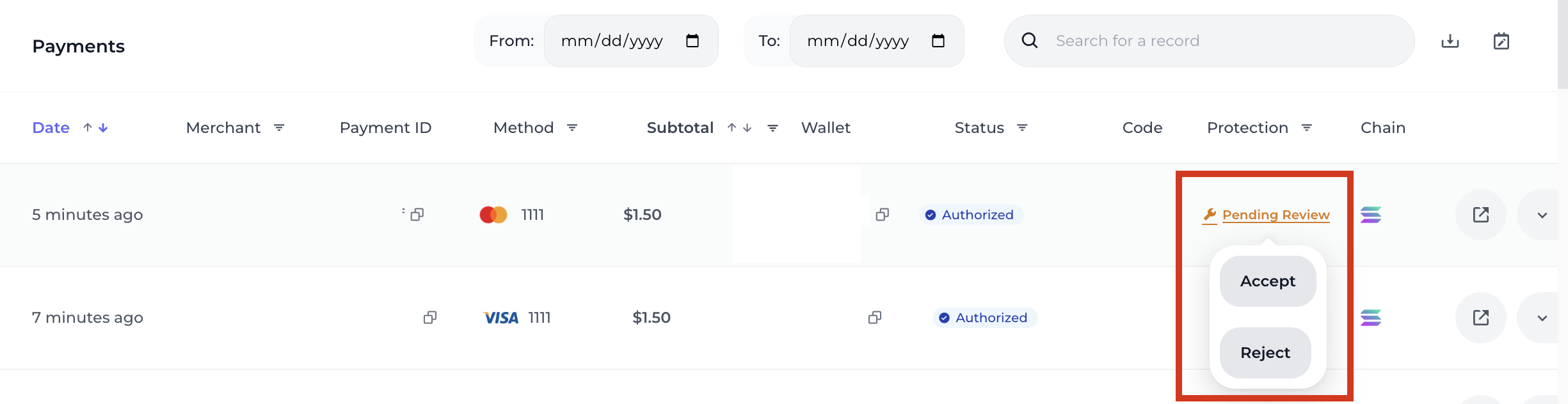
| If Accepted | The status updates to Overridden and you take on chargeback liability. |
|---|---|
| If Ignored | After 24 hours, Approvely will void the transaction, and status remains Rejected. |
Merchants can customize the 24-hour review window.👉 Reach out to the Approvely team to enable chargeback reviews or adjust the review period.
Accepting Pending Reviews shifts the chargeback liability to you, the merchant.
Note:This review/override process does not apply to subscriptions.
Subscription purchases with chargeback protection will either be
ApprovedorRejected— no review window is available.
Updated 12 months ago